
Configuring the SOTI ONE Integration for SOTI Snap
Use the SOTI ONE Integration window to connect your MobiControl Managed SOTI Snap application with a SOTI MobiControl instance, enabling centralized app deployment, configuration, and management.
About this task
The MobiControl Managed SOTI Snap application must be
integrated with at least one SOTI MobiControl instance to enable
device app deployment, lockdown template configuration, and communication between
the two products. You can manage this integration from the SOTI ONE Integration window in the SOTI Identity console.
Note: Multiple SOTI MobiControl instances can link to the MobiControl Managed
SOTI Snap application.
Procedure
- Log in to the SOTI Identity console as an administrator.
-
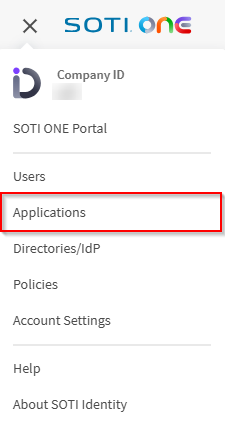
From the main menu, select Applications. The Applications section
opens.
-
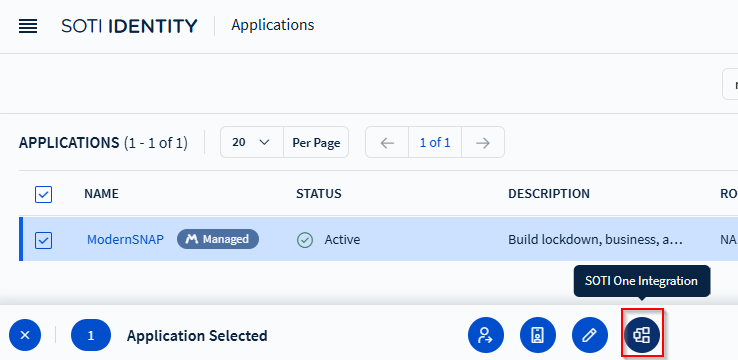
Select the checkbox for your MobiControl Managed SOTI Snap application, then select SOTI ONE Integration in the action bar.
-
Select the Integrate SOTI Snap With
SOTI MobiControl dropdown, then choose the
SOTI MobiControl instance you want to integrate.
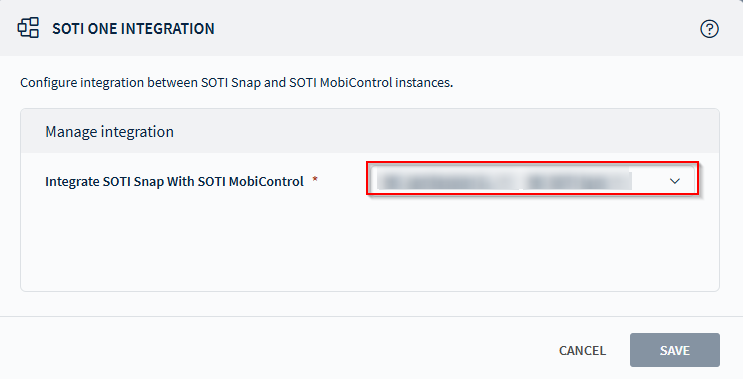
- Select Save.