
SOTI Cloud Link Agent in the Security Access Table
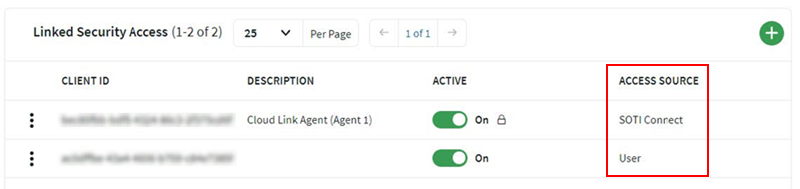
When you add a new SOTI Cloud Link Agent, it is automatically added to the Security Access table. The table identifies whether the agent was created by the system or added manually.
| SOTI Connect | The agent was added automatically and is controlled by the system. |
| User | The agent was added manually and is controlled by the user. |
Note:
- Entries with SOTI Connect as the Access Source cannot be deleted. You cannot toggle their Active status, and you may only edit the description.
- Entries with User as the Access Source can be fully managed. You may edit the Agent Client ID, Client Secret, and delete the entry if required.