
Local Users - Configuration Details
This configuration enables you to add/manage local users for your Windows Modern devices.
General Details
| Feature | Details |
|---|---|
| Group | Select
the permissions for the user:
|
| Username | Enter a displayed username for the user. |
| Name | Enter the full name of the user. |
| Description | (Optional) Enter a description for the user. |
| Auto Generate Unique Password | Enable this configuration to automatically generate a unique password for the user. |
| Password | Enter the user password. |
| Confirm Password | Re-enter the user password to confirm. |
Note: Local users are not deleted when revoking a Local User
configuration profile.
After assigning the profile, the Local Users table displays the Username, Group and Created By fields for all users of the device. See Viewing Device Information for more details.
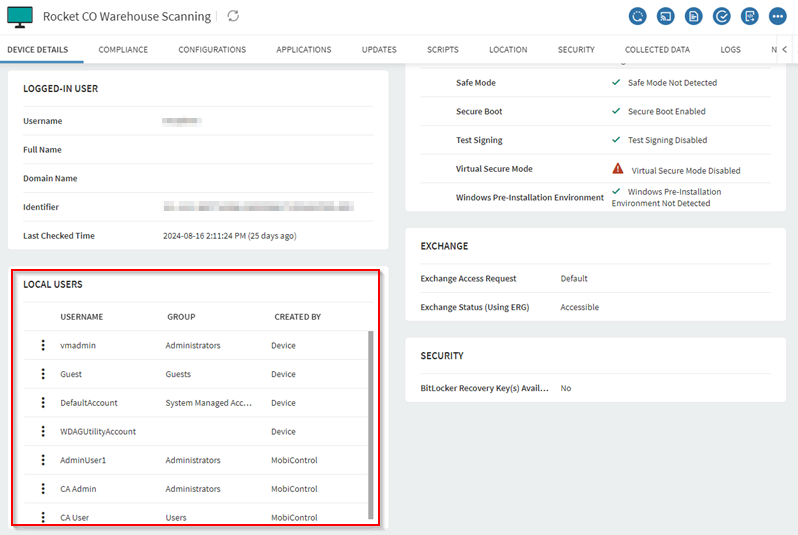
Local User Management
To manage password, group membership or delete a local user, select the More icon next to the user's name.
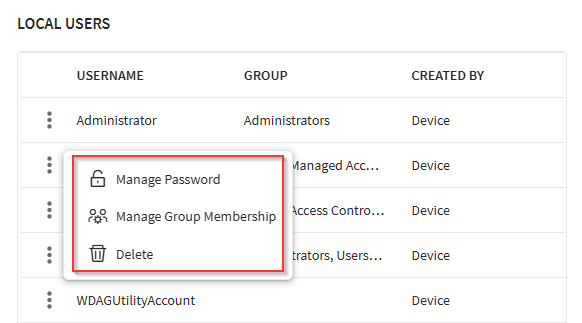
The following options are available:
- Manage Password: Enables you
to
manage the local user's password.Note: If you chose an auto generated password option to manage passwords, the existing password field is pre-populated.
- Manage Group Membership: Enables you to change and
manage
group memberships for local users, including custom groups. This requires
Manage Device User(s) and Configure Device/Device Groups permissions.Note: Supports Windows 10, version 20H2 and later.Note: By default, the active group membership is selected.Note: For the group permissions to take effect, the local user must either sign out or restart the device.Warning: If no group memberships are selected, the user will be unable to log on to the Windows device.
- Delete: Enables you to delete a local user. This
requires Manage Device User(s) permission under Device Group
Permission.Note: While you can delete users from the device, SOTI MobiControl may recreate them due to profile assignment. To permanently remove a user, delete them from both the device and the profile.