
Overview of SOTI XSight Architecture
This section provides an overview of the SOTI XSight architecture, and information about setting up SOTI XSight.
SOTI XSight integrates with SOTI MobiControl for:
- License management.
- Authentication and authorization.
- Role management.
- User lookups and support email processing.
- Retrieval of device and device group information.
- Setting up remote-control, Linux terminal and web console connections.
- Data collection from devices.
The diagram below shows a simple on-premises setup of SOTI XSight that is co-located with SOTI MobiControl.
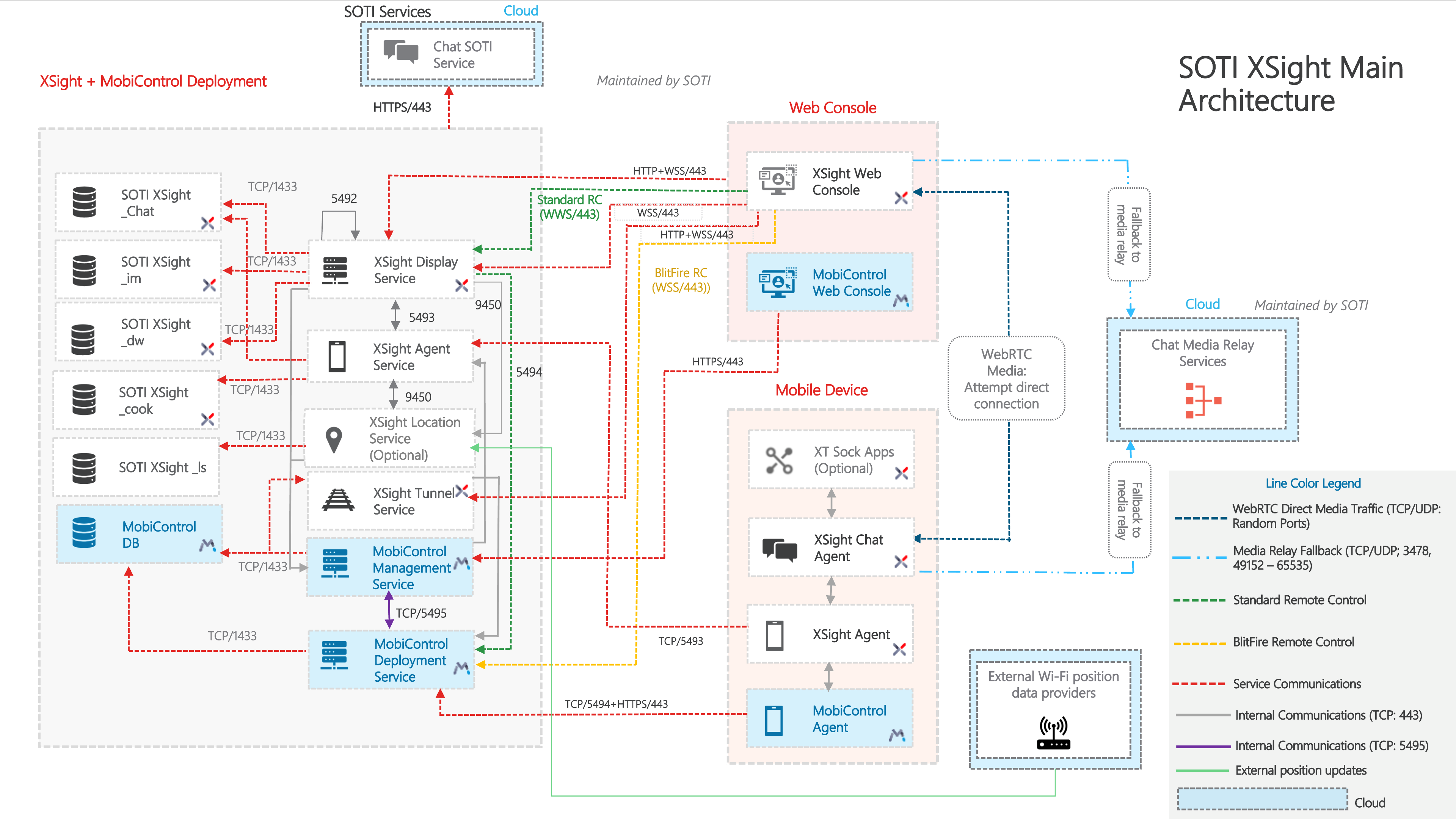
Core Components
| Component | Function |
|---|---|
| SOTI XSight Service | A Windows service that hosts the SOTI XSight web console |
| Tunnel Service | A Windows service that provides functionality to access the command-line terminal and administrative web console on Linux devices. |
| SOTI XSight Agent Service | A Windows service that is responsible for communicating with the SOTI XSight Agent, to receive collected data and send agent configurations. |
| SOTI XSight Agent | A mobile application that collects data and runs data analysis on mobile devices. |
| XT Sock Smart Battery Plugin | An OEM-specific plugin that collects smart battery data from devices and reports it to the SOTI XSight Agent. |
| SOTI XSight Services | A service hosted by SOTI that provides licensing and supplies device skins for remote-control. |
| SOTI XSight Database | A database that stores all data related to incident management, general configurations, user preferences and authorization. |
| SOTI XSight Chat Database | A database that stores all data related to Chat and Live Support services. |
| SOTI XSight Cook Database | A database that stores data collected from the agents, SOTI MobiControl device and device group reference information, and configuration information for device agents. |
| SOTI XSight DW Database | A database that stores all processed and aggregated data for the SOTI XSight Operational Intelligence dashboards. |
Network Communications
SOTI XSight uses the following ports to communicate between components.
| Component Name | Protocol | TCP Port(s) | Direction |
|---|---|---|---|
| SOTI Services (skinsapi.soti.net & sotiassistservices.soti.net) | HTTPS | 443 | Outbound |
| SOTI XSight Web Console | HTTPS | 443 | Inbound |
| SOTI XSight IM Database | TCP | 1433 | Outbound |
| SOTI XSight DW Database | TCP | 1433 | Outbound |
| SOTI MobiControl Deployment Service | TCP | 1433 | Outbound |
| Component Name | Protocol | TCP Port(s) | Direction |
|---|---|---|---|
| Mobile Client: SOTI XSight Agent | TCP (comm) | 5493 | Inbound |
| SOTI XSight Cook Database | TCP | 1433 | Outbound |
| Component Name | Protocol | TCP Port(s) | Direction |
|---|---|---|---|
| SOTI XSight Agent | HTTPS, Web Socket | 443 | Inbound |
| SOTI XSight Web Console | HTTPS, Web Socket | 443 | Inbound |
| SOTI XSight Chat Database | TCP | 1433 | Outbound |
Coturn Service
- Coturn service is currently hosted on a Cloud environment.
- Coturn port: 3478 (TCP/UDP)
- Customers should not block these ports for outbound communication : 49152-65535 UDP
- Coturn service configuration for each Chat Service instance is fetched via SOTI services, based on the SOTI MobiControl Registration Code and Installation ID. Limitation: XS-6752
- Load balanced vs non-load balanced setup:
- For Non-load balanced setup, enter the local server hostname and port details of the Chat Service
- For Load balanced setup, enter the details of the load balancer - load balancer hostname and the port assigned for Chat Service. The Coturn Server must be hosted outside of the load balanced environment.
- For On-premise setup:
- If all the services are available within the company's intranet, then there is no mandatory need for Coturn server. If the Coturn server must be hosted on-premise, you must change the Chat Service/Sabha backend to handle requests internally rather than from SOTI Services.
| Component Name | Protocol | TCP Port(s) | Direction |
|---|---|---|---|
| SOTI XSight Location Service | TCP | 9450 | Inbound |
| Cisco Spaces Data Provider | TCP | 5003 | Inbound |
| Extreme Networks Data Provider | TCP | 5004 | Inbound |
| Juniper Data Provider | TCP | 5005 | Inbound |
- Location service exposes endpoints that allow external data providers to push device location updates to SOTI XSight.
- These endpoints should be publicly accessible and should be verified with a valid SSL certificate.
- The respective port should be opened publicly on the network configuration rules
to allow the data provider to push updates to the server hosting Location
Service. The port can be configured in the SOTI XSight Admin
Utility. The port defaults are:
- Cisco Spaces: 5003
- Extreme Networks: 5004
- Juniper: 5005
| Component Name | Protocol | TCP Port(s) | Direction |
|---|---|---|---|
| SOTI MobiControl Deployment Server | TCP | 5494 | Outbound |
| SOTI MobiControl Management Service | HTTPS | 443 | Outbound |
| SOTI XSight Display Server | HTTPS | 443 | Inbound |
| SOTI XSight Web Console | HTTPS, Web Socket | 443 | Inbound |