
|
Samsung Android Device Agent |
The MobiControl Device Agent is the MobiControl software that is installed onto mobile devices. The Device Agent communicates with MobiControl Deployment Server(s) and carries out the instructions it receives from servers. Device Agents also provide reporting and real-time information to Deployment Servers.
Android Device Agent Installation
The MobiControl Device Agent is typically installed from the Android Market by searching for MobiControl. When the Device Agent has been installed from the Android Market the user will be required to enter an Enrollment ID which is provided when you create an add devices rule. For more information on creating an add devices rule click here. The Samsung MobiControl Device Agent can also be installed from Samsung Apps by searching for MobiControl. The Device Agent version available in Samsung Apps has advanced capabilities for Samsung devices with the Advanced Samsung MDM API's. For more information on the Advanced Samsung MDM API's please contact your local Samsung hardware sales representative.
Administrators also have the option of exporting the MobiControl Device Agent .APK (Android Application Installer) and placing it in the root of an Android device's SD Card, along with the MCSetup.ini. Both of these files are downloaded when an add devices rule is created. When the Device Agent finds the MCSetup.ini on the SD Card, it will not require Enrollment ID information. For more information on creating an add devices rule click here.
Device Agent Configuration Applet
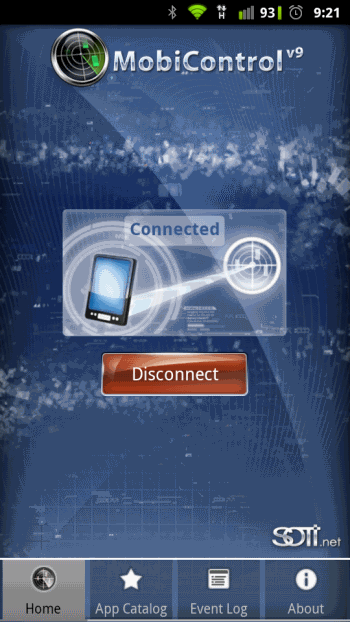
Once installed on the Android Device the Device Agent enables the user to connect or disconnect from the Deployment Server Server, as well as view the Application Catalog.
| Tab | Description |
|---|---|
| Home Tab | user has the option to bring the device Online or Office by clicking the Connect/Disconnect button. |
| App Catalog | This is the Application Catalog tab. For more information See "Samsung Android Application Catalog Android" |
| Event Log | Displays recent events for the Device Agent, such as connection attempts |
| About | About screen shows Device Agent information |
Android Device Agent Uninstallation
The MobiControl Device Agent is installed on the device as a "Device Administrator", first step in uninstalling the Device Agent is to remove the agent as the "Device Administrator". To remove the Device Agent as the "Device Administrator", on the Android device open Settings > Location & Security > Select Device Administrators > Remove the check mark for MobiControl. Once the MobiControl Device Agent is no longer the "Device Administrator" it can be removed like any other Android Application. On the Android device open Settings > Applications > Manage Applications > MobiControl > Uninstall.