
|
Device Event |
A Device Event is an alert triggered based on an assortment of device specific
conditions. See below for a full list.

Windows Devices
The Device Events listed below are specific to Windows Devices.
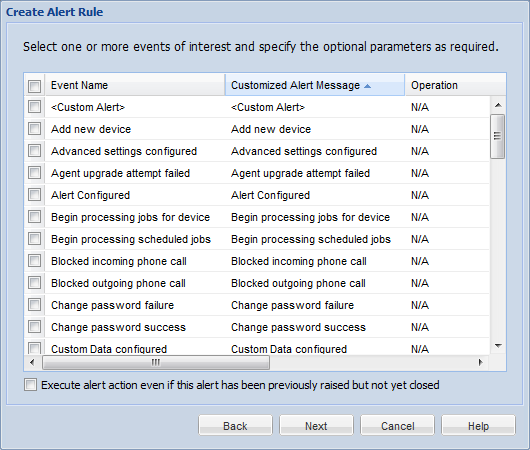
Device Event Notification Selection Window
Severity is set to Minor by default and can be altered.
The below table shows all available default Device events:
| Log Event | Alert Message (Customisable) |
|---|---|
| <Custom Alert> | <Custom Alert> |
| Add new device | Add new device |
| Advanced settings configured | Advanced settings configured |
| Agent upgrade Attempt failed | Agent upgrade attempt failed |
| Alert Configured | Alert Configured |
| Begin processing scheduled jobs | Begin processing scheduled jobs |
| Blocked incoming phone call | Blocked outgoing phone call |
| Change password failure | Change password failure |
| Change password success | Change password success |
| Custom Data configured | Custom Data configured |
| Custom log | Custom log |
| Data Collected | Data Collected |
| Data Collection configured | Data Collection configured |
| Dependent packages not installed | Dependent packages not installed |
| Device connected | Device connected |
| Device disabled | Device disabled |
| Device disconnected | Device disconnected |
| Device Enabled | Device Enabled |
| Device has not been connected for %VALUE% minutes | Device has not been connected for %VALUE% minutes |
| Device Manually relocated | Device Manually relocated |
| Device relocated | Device relocated |
| Device security configured | Device security configured |
| Error creating file on device | Error creating file on device |
| Error message received from device | Error message received from device |
| Error receiving file | Error receiving file |
| Error sending file | Error sending file |
| Error sending message | Error sending message |
| Error writing to file on device | Error writing to file on device |
| Exchange ActiveSync configured | Exchange ActiveSync configured |
| File synchronization failed | File synchronization failed |
| File synchronization was aborted by pre-sync script | File synchronization was aborted by pre-sync script |
| File(s) synchronized | File(s) synchronized |
| File synchronization was aborted by pre-sync script | File synchronization was aborted by pre-sync script |
| File synchronization failed | File synchronization failed |
| Geofencing Configured | Geofencing Configured |
| Inaccurate device date-time detected | Inaccurate device date-time detected |
| Incompatible platform, processor or os version | Incompatible platform, processor or os version |
| Installation aborted by user | Installation aborted by user |
| Installation was aborted by install script | Installation was aborted by install script |
| Insufficient free space on device | Insufficient free space on device |
| Invalid device software version | Invalid device software version |
| Invalid message received from device | Invalid message received from device |
| Lockdown removed | Lockdown removed |
| Logon failure | Logon failure |
| Logon success | Logon success |
| Multiple packages with the same name in job list | Multiple packages with the same name in job list |
| No Package ID in installation report | No Package ID in installation report |
| Package file is corrupted | Package file is corrupted |
| Package file not found | Package file not found |
| Package uninstalled | Package uninstalled |
| Package with higher version number already installed on the device | Package with higher version number already installed on the device |
| Pending jobs cannot be processed until device user is authenticated | Pending jobs cannot be processed until device user is authenticated |
| Process Learned | Process Learned |
| Processed successfully | Processed successfully |
| Remote Control | Remote Control |
| Stopped illegal process | Stopped illegal process |
| Time Sync Configured | Time Sync Configured |
The following list of variables are only available within the Customized Alert Message field:
| Type | Description |
|---|---|
| %RULENAME% | The name of the rule |
| %PACKAGENAME% | The name of the package |
Select devices.
Select the devices to which the rule will be applied. Apply the rule to all devices in your device tree or simply individual group(s) and/or device(s). Once you have completed this section, click the Next button.
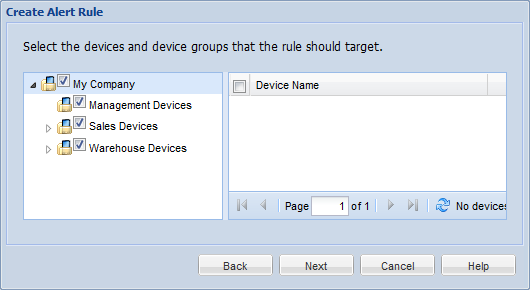
After selecting your target devices, click Next and continue the Alert Rule Wizard here.

iOS Devices
The Device Events listed below are specific to iOS Devices.
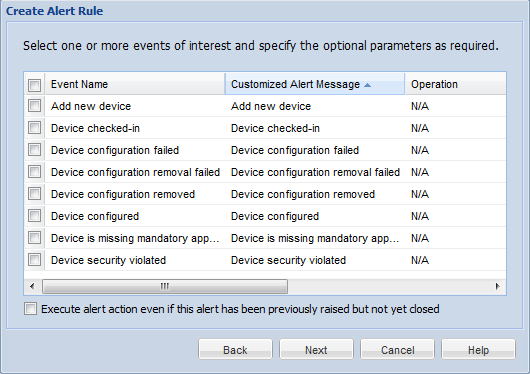
Device Event Notification Selection Window
Severity is set to Minor by default and can be altered.
The below table shows all available default Device events:
| Log Event | Alert Message (Customisable) |
|---|---|
| Add new device | Add new device |
| Device Checked-in | Device Checked-in |
| Device Configuration Failed | Device Configuration Failed |
| Device Configuration Removal Failed | Device Configuration Removal Failed |
| Device Configuration Removed | Device Configuration Removed |
| Device Configured | Device Configured |
| Device is missing mandatory application | Device is missing mandatory application |
| Device security violated | Device security violated |
Select devices.
Select the devices to which the rule will be applied. Apply the rule to all devices in your device tree or simply individual group(s) and/or device(s). Once you have completed this section, click the Next button.
After selecting your target devices, click Next and continue the Alert Rule Wizard here.

Android Devices
The Device Events listed below are specific to Android Devices.
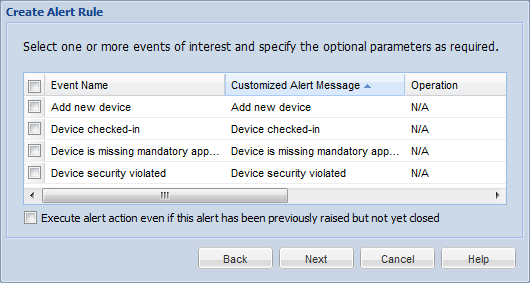
Device Event Notification Selection Window
Severity is set to Minor by default and can be altered.
The below table shows all available default Device events:
| Log Event | Alert Message (Customisable) |
|---|---|
| Add new device | Add new device |
| Device Checked-in | Device Checked-in |
| Device is missing mandatory application | Device is missing mandatory application |
| Device security violated | Device security violated |
Select devices.
Select the devices to which the rule will be applied. Apply the rule to all devices in your device tree or simply individual group(s) and/or device(s). Once you have completed this section, click the Next button.
After selecting your target devices, click Next and continue the Alert Rule Wizard here.