
|
iOS Restrictions |
For security-conscious organizations and environments where privacy and information security concerns require controlling the unauthorized transfer of mobile data out of the mobile devices, MobiControl provides various on-device feature controls including the capability to block various device communications, similar to firewall functionality. MobiControl's device features control policy allows IT administrators to selectively disable device features. Applying the policy at the individual or group level allows custom profiles for different users and locations in an organization. For example, disabling or enabling Bluetooth and infrared ports determines if end users can beam business cards, applications or documents to one another.
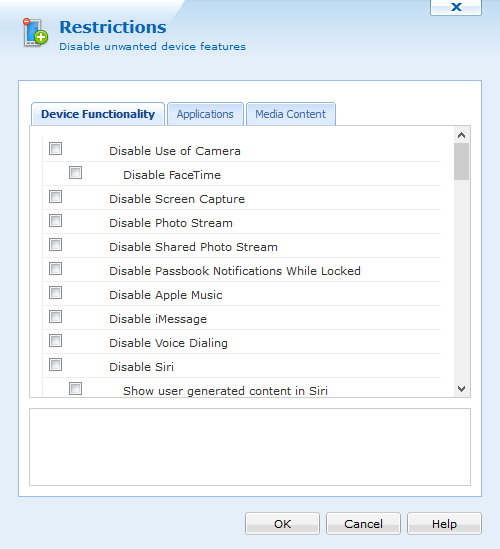
Device Feature Control Policy dialog box
To set Restrictions for a device or group of devices,
select  (on the iOS tab and the Profiles tab) to create a new profile and payload. (Please see the iOS Device Configuration page.)
The following features can be enabled or disabled using the device feature control policy:
Device Functionality
| Option | Description |
|---|---|
| Disable use of Camera | Control the ability of capturing unauthorized photographs by disabling the device’s camera. |
| Disable FaceTime | Prevents the user from utilizing FaceTime. |
| Disable screen capture | Control the ability of applications to capture the device screen. |
| Disable Photo Stream | Prevents the users from using the photo streaming function. |
| Disable Shared Photo Stream | Prevents users from viewing Shared Photo Streams on their device. |
| Disable Passbook Notifications While Locked | Prevents the ability to see Passbook notifications on the lock screen. |
| Disable Apple Music | Prevents users from accessing Apple Music |
| Disable iMessage | Prevents users from sending or receiving messages through iMessage. |
| Disable Voice Dialing | Prevents users from dialing their phone using voice commands |
| Disable Siri | Prevents user from using voice commands to control their device |
| Show user generated content in Siri | Allows Siri to show user generated content |
| Disable Siri While Device is Locked | Prevents the use of Siri while the device is locked |
| Enable Siri Profanity Filter | Creates a filter for profane language |
| Disable iBookstore | Prevents users from viewing and accessing the iBookstore through the iBooks App |
| Disallow Erotica Content | Prevents users from purchasing books categorized as Erotica from the iBookstore |
| Disable Installation of Apps | Disables the installation of Apps from the App Store . Users can still install and update applications using iTunes or Apple Configurator. |
| Disable automatic app download | Prevents users from automatically downloading applications purchased on other devices. |
| Disable trusting new enterprise app authors | Prevents users from trusting enterprise applications |
| Disable In App Purchasing | Prevents the user from purchasing additional features of an application or an additional app from within an app. |
| Disable AirDrop | Prevents users from sharing files with other Apple devices using AirDrop. |
| Hide Control Centre in Lock Screen | Prevents users from accessing Control Centre while on the Lock Screen |
| Hide Notification Centre in Lock Screen | Prevents users from accessing Notification Centre while on the Lock Screen |
| Hide Today View in Lock Screen | Prevents users from accessing the Today View in the Lock Screen |
| Disable App Removal | Prevents users from removing apps from their device |
| Disable Account Modification | Prevents users from making account additions or modification to Email, Contacts, and Calendars |
| Disable App Cellular Data Usage Modifications | Prevents users from making modification to app cellullar data usage |
| Disable Cloud Keychain Sync | Disables the synchronization of login credentials between iOS devices associated with an iCloud account. |
| Disable Storing Data in iCloud for Managed Apps | Prevents users from storing the data from Managed Applications in iCloud |
| Allow Host Pairing | Allows the device to pair with any host computer |
| Disable Managed to Unmanaged Data Sharing | Prevents Managed apps from sharing data with Unmanaged apps |
| Disable Unmanaged to Managed Data Sharing | Prevents Unmanaged apps from sharing data with Managed apps |
| Disable OTA (over-the-air) PKI Updates | Prevents device from obtaining public key infrastructure (PKI) updates OTA |
| Limit Ad Tracking | Prevents apps from using the Advertising Identifier |
| Disable erase All Content and Settings | Prevents users' ability to use Erase All Content and Settings option in Reset UI |
| Require iTunes Password for all purchases | Users are required to enter their Apple ID password before every purchase from iTunes. Ignores the standard grace period between purchases |
| Disable iCloud Document Synching | Prevents users from storing documents in iCloud |
| Disable iCloud Device Backup | Prevents the device from automatically backing up device data to iCloud |
| Disable iCloud Photo Library | Prevents users from using iCloud Photo Library |
| Disable automatic sync while roaming | Control the ability to sync data (i.e. email) while in foreign coverage areas and prevent related expenses by disabling roaming syncing. |
| Force Encrypted Backups | Forces backups to iTunes to be encrypted, this is always selected. Note This option should not be used with Supervised devices. |
| Automatically reject Untrusted TLS Certificates | Users will not be prompted to trust certificates that cannot be verified. This setting applies to Safari and to Mail, Contacts and Calendar accounts. |
| Disable Interactive Configuration Profile Installation | Prevents users from installing additional configuration profiles and certificates manually |
| Disable Submission of Diagnostic and Usage Data | Disables submission of iOS diagnostic and usage information to Apple |
| Disable Touch ID | Prevents users from using Touch ID |
| Disable Passcode Modification | Prevents users from adding, changing, or removing a device's passcode |
| Disable Touch ID fingerprints Modification | Prevents users from modifying Touch ID fingerprints |
| Disable Apple Watch pairing | Prevents users from pairing with an Apple Watch |
| Force Apple Watch wrist detection | Paired Apple Watch is forced to use Wrist Detection |
| Treat AirDrop as unmanaged | Classifies AirDrop as an unmanaged drop target |
| Disable Handoff | Prevents user from using Handoff |
| Disable Internet Search Results in Spotlight | Prevents device from returning internet content in Spotlight search results |
| Disable modifying restrictions | Prevents users' ability to enable Enable Restrictions option in the Restrictions UI in Settings |
| Disable modifying device name | Prevents users from changing the device name |
| Disable modifying Device Wallpaper | Prevents users from changing the device wallpaper |
| Force passcode on first Airplay Pairing | Forces all devices receiving AirPlay requests from this device to use a pairing password |
| Disable predictive Keyboard | Prevents users from using predictive keyboards |
| Disable auto correction | Prevents users from using keyboard auto-correction |
| Disable spell check | Prevents users from using keyboard spell-check |
| Disable Define Lookup | Prevents users from using definition lookup |
Applications
| Option | Description |
|---|---|
| Disable YouTube | Prevents user from accessing YouTube (iOS 5 only) |
| Disable iTunes Music Store | Prevents user from accessing iTunes Music Store |
| Disable Find My Friends App Modification | Prevents user from making changes within the Find My Friends app |
| Disable Game Center | Removes Game Center app from the device Home Screen |
| Disable Addition of Game Center Friends | Prevents users from adding friends to Game Center |
| Disable Multiplayer Gaming | Prevents users from playing multiplayer games in Game Center |
| Disable Safari | Prevents user from accessing Safari to browse websites |
| Disable Autofill | Prevents the browser from using autofill to complete forms displayed on websites |
| Disable Fraud Warning | Prevents the browser from alerting for fraud |
| Disable JavaScript | Prevents the browser from running JavaScript |
| Prevent Pop-ups | Prevents the browser from opening pop-ups |
| Accept All Cookies | Forces the browser to accept all cookies |
| Accept Cookies from Visited Sites Only | Forces the browser to accept cookies from visited sites only |
| Disable News | Disables news |
| Disable Podcast | Prevents users from using podcasts |
| Single App Mode | Allows device users to lock the device to a single app from a selection of apps specified by the administrator.
Click the List button to add applications to the Single App Mode Whitelist. Next, click Add to enter the bundle identifier of the app. Note: The Single App Mode configuration supersedes this Restriction setting if both are assigned to the same device. |
Media Content
| Option | Description |
|---|---|
| Movies | Sets the maximum rating for movies to:
|
| TV Shows | Sets the maximum rating for TV shows to:
|
| Apps | Sets the maximum rating for apps to:
|
| Disallow Explicit Music & Podcasts | Prevents user from downloading music or podcasts containing explicit content |
 Notes:
- Certain processes and applications are critical and necessary for stable device operation and normal execution of the MobiControlDevice Agent. These processes are automatically protected through a built-in "permanent white list" and cannot be put on a black list. Applications that are included in a lockdown program menu are automatically on a white list, and cannot be put on a black list.