Android Speed Lockdown |
Device lockdown replaces the standard device home screen with a customizable home screen. Users have access only to authorized applications and websites, and are prevented from accessing all other applications and device controls while on the road. This promotes greater safety by disabling distracting features on a mobile device while workers are on the road.
Note:
Device lockdown is not supported on Sony devices running Android L and above.
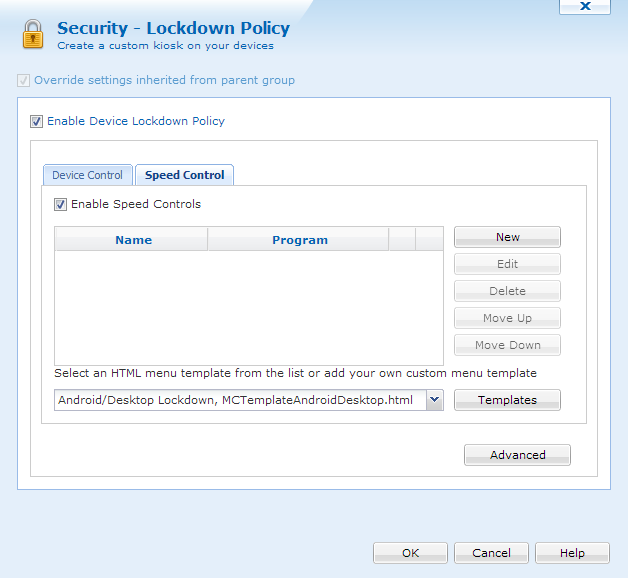
Lockdown Policy dialog box
For information on how to set up menu items and configuring lockdown templates, please click here.
Speed Lockdown triggers when the device is going a certain speed, as set in the Advanced settings. The speed of the device is determined by utilizing the device's GPS unit. Using the device's GPS unit, MobiControl periodically checks the location of the device along with the time. It will then check again and determine the distance between the two points and calculate the device's speed.
Since there are times where there could be traffic, or stop lights, having the speed lockdown disengage and re-engage constantly will cause distraction to a driver. Because of this, the speed lockdown has engage and disengage functionalities. These and other settings can be configured by clicking  .
.
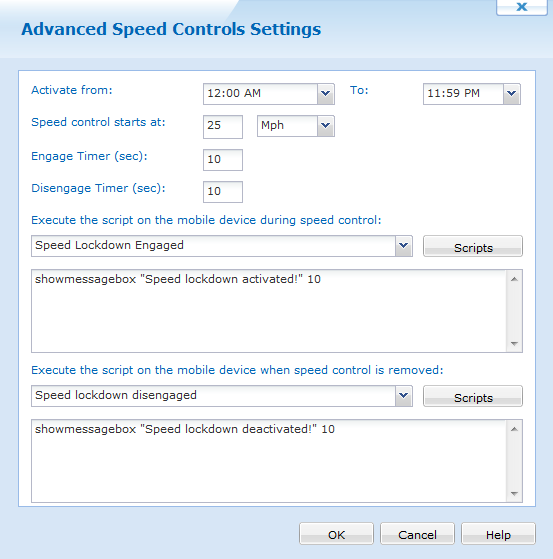
Advanced Speed Control Settings
Below are brief descriptions of each feature in the Advanced Speed Control settings.
| Field | Description |
|---|---|
| Activate From, to | Here we can set when the speed control should activate. We can set it for the whole day or even 15 minutes. |
| Speed Control starts at |
This is where we decide what speed the device should be travelling before the engage timer starts counting. We can change the speed measurement to either Mph or Km/h. |
| Engage Timer | The amount of time the device should stay on or above the speed control before the lockdown activates. |
| Disengage Timer | The amount of time the device stays below the specified speed control before disengaging. |
| Execute script on the mobile device during speed control | When the speed control lockdown is activated, send this script to the device. |
| Execute script on the mobile when speed control is removed | When the speed control lockdown is deactivated, send this script to the device. |
Using the above screen shot, the speed lockdown is activated the whole day, should engage when the device is travelling at 25 Mph or higher for at least 10 seconds. If it falls below the specified speed, wait 10 seconds before disengaging the speed control. When the speed control is activated, send a message box to the device, and when the speed control is removed, send another script.