iOS Location Services |
MobiControl's Location Services provides the ability to locate and track the physical location of mobile devices using a combination of GPS, WiFi and Cellular networks.
Note
iOS protects user privacy by allowing the user to decide which apps can use the location data of the device. MobiControl is therefore limited to providing "best-effort" location services for iOS.
The following requirements are necessary for MobiControl to receive accurate location data:
- The MobiControl app must be installed on the device
- Location Services must be enabled in the device's privacy settings
- Location Services must be enabled in the device's privacy settings - specifically for the MobiControl app
- Airplane mode is disabled
If you are using an app that leverages the MobiControl SDK for iOS, both the SDK-enabled app and the MobiControl app will be used for location services. Both applications have the same dependencies, but can operate independently from one another.
MobiControl's Locate feature locates devices on demand with precision accuracy. In addition to the above requirements, Locate requires that the MobiControl app is running in the foreground. If the app is running in the background, results shown in the MobiControl Web Console indicate a historical location collected via a Data Collection rule.
MobiControl's Location Data Collection Rule - Location collects a device's location over time while the MobiControl application is in the background. The MobiControl app uses a low power location detection method and collects the approximate location of a device when it makes significant changes in physical location. In addition to the standard location service requirements, the data collection rule method also depends upon:
- The Location Services being set to Always in the device's privacy settings for the MobiControl app
- The iOS device having an active cellular connection
- The MobiControl app having been launched at least once
A temporary issue currently requires that the MobiControl app be opened for the collected location data points to be reported to the MobiControl server
Activating Location Services
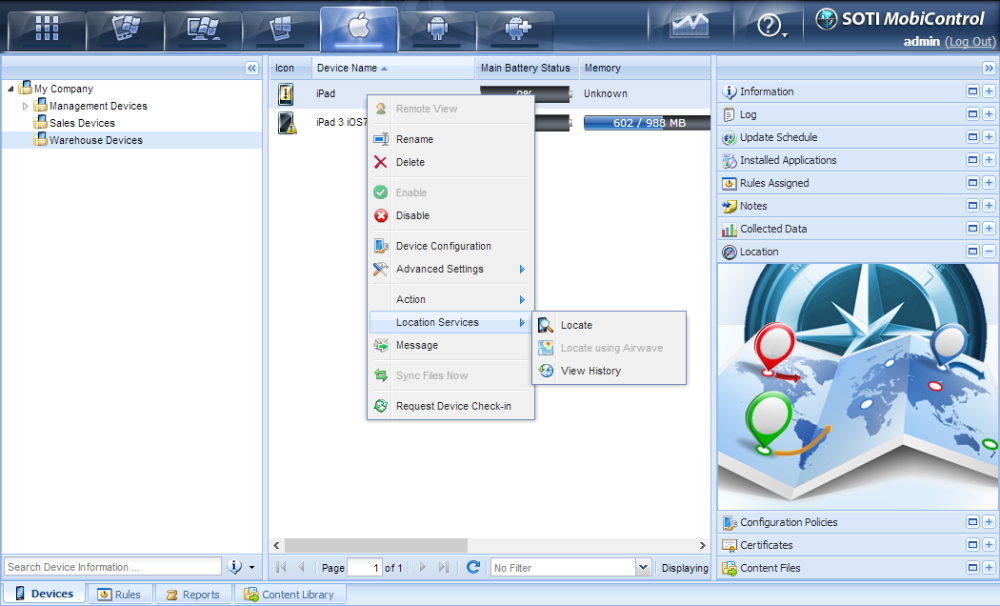
To activate Location Services for a device, go to the Devices tab and right-click on a device. Select the Location Services option from the menu. The first time you select an option from the Location Services menu for a device, it will automatically use the next available license. If there are no more licenses available, you will be notified to contact SOTI for information on acquiring additional licenses for Location Services.
iOS Location Services
Please Contact Us page to contact us for more details on acquiring additional licensing.
To learn more about Location Services, read about its features on the following pages:
Locate Devices page to pin-point the exact location of the mobile device anywhere in the world.
Show History page to plot where the device has travelled over a certain duration of time.
Go to Location page to locate and zoom the map to a specific address or landmark
Get Directions page to generate turn by turn directions and send them to the device.
Address Lookup page to find the physical address of a location on the map.
Using the Manage Geofences page to View, Edit and Delete the Geofences you have created.
 Notes:
- When using Location Services in MobiControl to track devices, Internet Explorer 7 or higher is required.
- The Current Format for Regional and Language Options on your PC MUST be compatible with Bing Maps. Click here for a list of supported Bing Map control settings.