
|
Renew MobiControl Root Certificate |
MobiControl's Root Certificate is automatically generated when you first install MobiControl.This ensures when devices connect to your MobiControl, it's trusted.
To ensure the validity of these certificates, it has an expiry date. When the MobiControl root certificate expires, your devices will no longer be able to connect.
When this certificate is about to expire, MobiControl will prompt you to renew this certificate.

Certificate Expiring Prompt
When you see this prompt, open the MobiControl Administration Utility. Please see the SOTI Administrator Utility page for more information.
Once opened, follow these steps:
- Click Certificates on the right hand side.
- Once in the Certificates section, you will see the following:
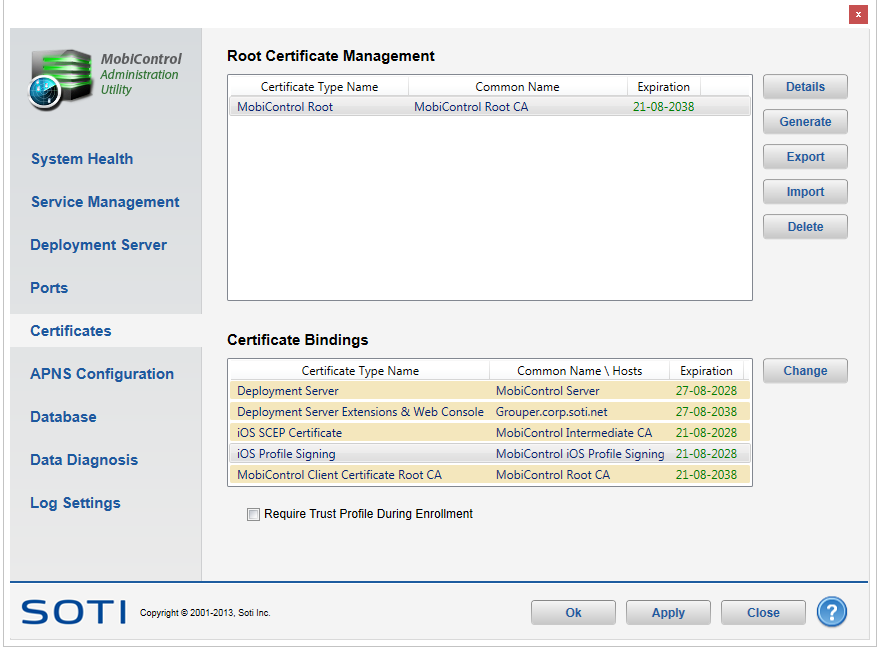
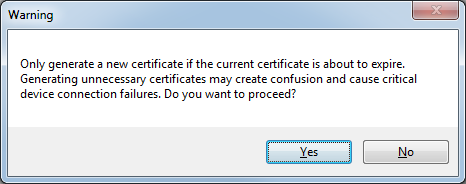
- Click Generate, and on the succeeding prompt, select Yes.
- Once a new certificate is generated, click OK in the MobiControl Admin Utility. Once clicked, MobiControl will restart it's services.
Once the services are restarted, you will no longer be prompted to renew your certificates, and your devices should continue to connect.