
|
Server Properties |
The Deployment Servers view (tab) in MobiControl Manager lists all MobiControl Deployment Servers installed, the online devices connected to the servers as well as properties for the servers. Users can remotely configure and manage Deployment Servers using the Deployment Servers view (tab).
Please see the Deployment Server Overview page for general concepts about MobiControl Deployment Servers.
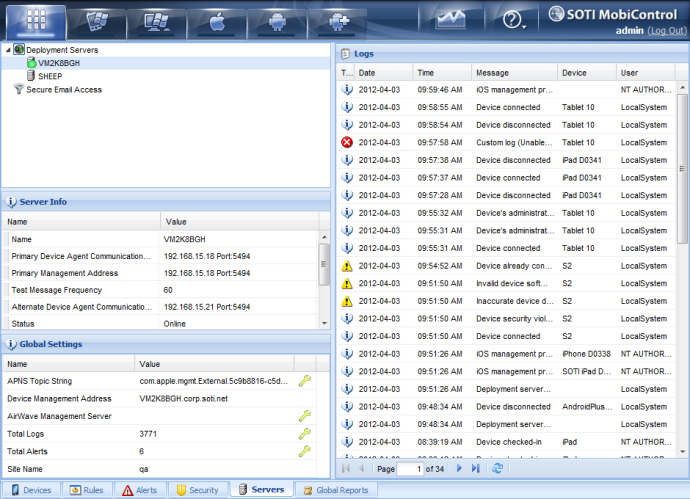
To set Deployment Server properties, select the icon for a particular Deployment Server in the Deployment Servers view (tab) and select the Server Properties option from the Deployment Server menu. The Deployment Server Properties dialog box will be displayed.
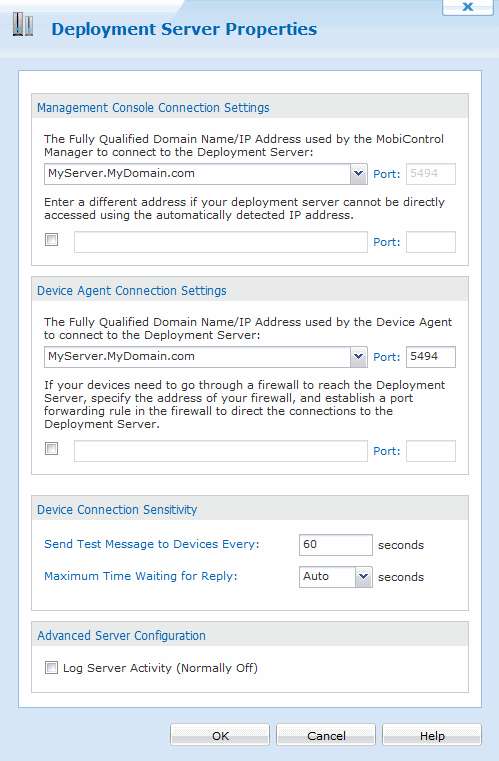
Deployment Server Properties dialog box
Server configuration and device connection sensitivity settings can also be changed through the Deployment Server system tray applet. Please see the Deployment Server Configuration page. The table below describes each field of the Deployment Server Properties dialog box:
| Field Name | Description |
|---|---|
| Management Console Connection Settings | This is the IP address or hostname used by the management console to connect to the Deployment Server to receive real-time updates. The Deployment Server automatically reads the default IP address assigned to the host computer upon which it is running. If you wish to change this IP address, select Override automatically detected IP address. You may also specify an alternate server address in situations where the device will need to use a different IP address when connecting to a certain IP network. This option is also useful when you need to move the from one host computer to another. |
| Device Agent Communication Settings |
We recommend you to specify a DNS resolvable hostname instead of a static IP address as the DNS resolvable hostname is less likely to change. This is the Fully Qualified Domain Name (ie Hostname)/IP address used by devices to connect to the Deployment Server to receive updates and facilitate remote control. By default, this address is the same as the management address. In situations where mobile devices need to go through a firewall or proxy server the devices may need to use external addresses for Deployment Servers that get mapped by the firewall or proxy server to the private network address. When MobiControl Device Agent software is generated, the server address for device communication is injected into the generated Device Agents. If you need to change the external IP address, you need to do this before you generate a Device Agent for new devices. For devices that are already connected to the Deployment Server, these settings are refreshed on the devices when they reconnect to the server. You may also specify an alternate server address in situations where the device will need to use a different IP address when connecting to a certain IP network. This option is also useful when you need to move the MobiControl Deployment Server from one host computer to another. When external addresses are configured, MobiControl Device Agents will try to connect to the Deployment Server using one of the addresses. If multiple addresses are configured, the set Deployment Server priorities will be used to determine which Deployment Server an agent should try to connect to. Please see the Deployment Server Priority page for information on Deployment Server priority configuration. Devices connecting through a proxyIf the Device requires proxy access to the Internet in order for the device agents to connect to the Deployment Server you can use the following settings in the Device Agent Connection Field: www Proxy:
|
| Send Test Message to Device Every |
This setting is used to control how often the Deployment Server is to send test message to device. MobiControl Deployment Servers send test messages (approximately 32 bytes) to devices periodically and then wait for the device to send the message back. If a Deployment Server does not receive a test message back within a specified time, it concludes that the connection is not functioning properly, and closes the connection to the device. For slow connections or situations where you are being charged based on your amount of data you send through the network (e.g. some cellular data plans) we recommend that you set the Deployment Server's Send Test Message to Devices Every setting to at least 180 seconds. |
| Maximum Time Waiting for Reply | This setting is used to control how long the Deployment Server will wait for the reply from the device. |
| Log Server Activity (Normally Off) | If this box is checked, the Deployment Server will start verbose logging. This may result in slowing down the response time problems, and working with SOTI support staff. Select the View Log button to display the debug log for the Deployment Server. This log provides useful information when diagnosing potential problems with technical support. |
 Note:
Note: