
|
Android File Synchronization Schedules |
The file synchronization schedule specifies when the Deployment Server(s) should check device(s) for synchronization.
If the Deployment Server identifies an inconsistency, such as a mismatch in the file size or finds the new file, the Deployment Server will act according to the file sync rule.
By default, the device synchronization schedule, specified by the add devices rule used to add the devices to the system, is selected for file synchronization. You may add, edit or delete the custom schedule using the following dialog box.
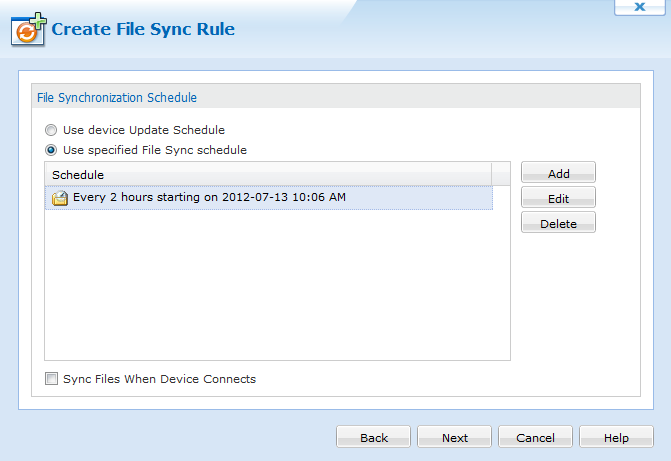
Create File Sync Rule Wizard dialog box
The following table describes the fields of the Create File Sync Rule Wizard dialog box.
| Field Name | Description |
|---|---|
| Add |
Specify your own file synchronization intervals. When you select Add, the Schedule Entry dialog box is displayed.
To sync twice a week (Monday at 06:00 and Friday at 19:00), create two weekly schedule entries. |
| Edit |
Select Edit to modify an existing schedule entry. The Schedule Entry dialog box is will be displayed. |
| Delete | Permanently remove a file sync schedule entry from the dialog box |
| Sync Files when device connects |
Sync whenever devices under this rule connect to a Deployment Server (i.e. transition from offline to online) |
 Example:
 Schedule Entry
The Schedule Entry dialog box allows you to specify schedule entries as one-time or periodic events.
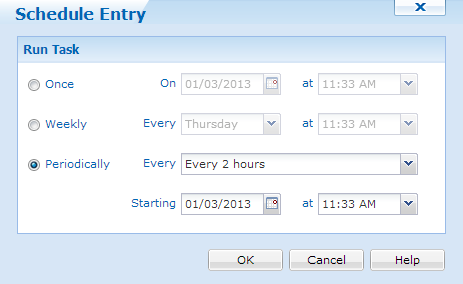
Schedule Entry dialog box
| Field Name | Description |
|---|---|
| Once | Device will check for file synchronization once at the specified date and time. |
| Weekly | Device will check for file synchronization once a week, on a specified day and time. |
| Periodically | Device will check for file synchronization periodically at the specified interval from the set, start date-time. |