LDAP Connections Manager
The LDAP Connections Manager allows you to create custom connections to Active Directory, Open Directory, Domino, and other LDAP servers. You can create multiple LDAP connections so that there are different connections for specific sections or features within MobiControl.
Within the LDAP Connections Manager you can create new LDAP connections or modify your existing ones. MobiControl supports the use of both generic LDAP (on-premises) and Microsoft Azure (AD in the Cloud) connections.
Types of LDAP Connections
You can configure your directory services in two different ways within MobiControl.
LDAP refers to the generic method of configuring LDAP connections. They are best suited for groups of users that are regularly within the company network.
Azure refers to Microsoft Azure LDAP connections or Active Directory (AD) in the cloud. Azure is optimal for managing users who spend a significant portion of time connected to your network via the cloud. Users can even self-enroll their devices with their AD credentials after the administrator creates an Add Devices Rule targeting them.
You must set up an Azure account before you can configure Azure settings in MobiControl. Visit Create Active Directory application in portal or browse Microsoft's Azure documentation for more information about using Azure with your directory service. After you have created an account, you must authenticate MobiControl to Azure AD. Follow these general steps:
Note
As a third-party procedure, this process is subject to change without notice. See Microsoft Azure documentation for the most current information.
- In the Azure Management Portal, add a new 'On-premises MDM application' from the gallery.
- Configure the application with the following settings :
- APP ID URI: https://DMA
- MDM Discovery URL: https://DMA/FederatedEnrollment/Discovery.svc
- MDM Terms of Use URL: https://DMA/FederatedEnrollment/TermsOfUse.svc/TermsOfUse
Where DMA refers to the Device Management Address of your MobiControl instance (found under Global Settings on the Servers tab).
- Configure permissions for the application.
- Find and copy the metadata URI of the application (generally found in the App Endpoints section). It will be necessary when you integrate your Azure LDAP groups with MobiControl.
- Proceed to Adding an LDAP Connection.
Adding an LDAP Connection
- On the All Platforms tab, on the Servers tab, go to Global Settings in the left panel.
- Scroll down to LDAP Connections and click the wrench icon to open the LDAP Connections Manager dialog box.
- Click New to select an LDAP connection type from the dropdown.
Select either LDAP or Azure.
-
Fill in the fields. See LDAP Connection Settings or Azure Connection Settings for more information on the fields and their requirements
-
Azure only: Click Manage to configure your Azure Tenant ID and Azure Application.
The administrator should have the following information from the Azure Management Portal ready:
- Federation Metadata Document URL
- Azure AD Graph API endpoint (domain name only) Default is set to
graph.windows.netby MobiControl. - Client ID of the application
- Client Key of the application
- Click Ok.
Complete the following steps if you want to use this LDAP connection for Web Console authentication. Otherwise you are ready to use LDAP for enrollment.
- On the Servers tab, under Global Settings, click the wrench icon beside Console Security Settings.
- Switch to the LDAP Integration tab.
- Check the Enable LDAP Integration checkbox.
- Select an LDAP group from the list and click OK to save your settings and close the dialog window.
LDAP Connection Settings
| Section | Description |
|---|---|
| Name | LDAP Connection name, for reference only |
| Server | LDAP Server’s hostname or its IP address |
| Port | LDAP Server connection port. The default is 389. If using SSL, the port is 636. The port can be any value if it matches server’s settings |
| Use SSL | If checked off, MobiControl secures the LDAP communication over a Secure Sockets Layer (SSL) tunnel |
| Accept Untrusted Certificates | This option allows SSL connections to use Untrusted Certification which in most cases is a self-signed CA root certificate. It’s not recommended to enable this in a production environment. |
| Authentication Type |
This option defines how to make a connection to the server and it should match to the server’s settings. It should be one of the three: Anonymous, Basic, Negotiate Anonymous: Indicates that the connection should be made without passing credentials Basic: Indicates that basic authentication should be used on the connection Negotiate: Indicates that Microsoft Negotiate authentication should be used on the connection. |
| User | The user name used for binding to the connection when the authentication Type is Basic or Negotiate |
| Password | The password of the binding user |
| Base DN (Distinguished Name) | The top level of the LDAP directory tree is the base, referred to as the "base DN". This option is to define the highest level of the LDAP search scope. a.k.a. RootContainer |
| LDAP Server | This defines the LDAP server type. We can select Active Directory, Open Directory, Domino, or other. The server type will decide what default search attributes will be used. |
After setting up the connection for the LDAP server, you can configure the General, Group, and User Attributes.
General Attributes
| Attribute | Description |
|---|---|
| Object Class | Identifier name of the Object Class, a keyword indicating this is an objectclass definition (or others). Default is "objectClass" and an alternative could be "objectCategory" |
| Object Class Group Attribute | The keyword to define the search filter for group related searching |
| Object Class User Attribute | The keyword to define the search filter for user related searching |
| Default Naming Context | This defines the Root DSE Attribute and which is used to define the root directory server entry (DSE) for the server instance |
Group Attributes
| Attribute | Description |
|---|---|
| Identifier | The keyword to define the search filter for fetching the object Security Identifier (SID) of the group |
| Common Name | The keyword to define the search filter for fetching the common name |
| Account Name | The keyword to define the search filter for fetching the account name |
| Search Pattern | The search string for fetching group attributes. LDAP Administrators should be able to configure any custom search strings. |
| Member | The keyword to define the search filter for fetching memberships of group attributes |
| Nested Group | The keyword to define where the search filter should look for when searching groups |
User Attributes
| Attribute | Description |
|---|---|
| Identifier | The keyword to define the search filter for fetching the object Security Identifier (SID) of the group |
| Common Name | The keyword to define the search filter for fetching common names |
| Account Name | The keyword to define the search filter for fetching account names |
| The keyword to define the search filter for fetching user emails | |
| Search Pattern | The search string for fetching user attributes |
| User Principal Name | The keyword to define the search filter for fetching user principal names |
| Account Expires | The keyword to define the search filter for fetching user account expiring info |
| First Name | The keyword to define the search filter for fetching the user’s first name |
| Last Name | The keyword to define the search filter for fetching the user’s middle name |
| Phone Number | The keyword to define the search filter for fetching the user’s last name |
| Custom Attribute 1 | The keyword to define the search filter for fetching the first customized user property |
| Custom Attribute 2 | The keyword to define the search filter for fetching the second customized user property |
| Custom Attribute 3 | The keyword to define the search filter for fetching the third customized user property |
Azure Connection Settings
| Attribute | Description |
|---|---|
| Name | Name of the new connection |
| Azure GraphApi Address |
The service root for the Graph API request Default address is https://graph.windows.net |
| Azure Tenant ID | The identifier for the tenant that the request targets. |
| Azure Application | MDM associated with the Tenant ID |
Azure Tenant ID
Find the relevant Azure information from your Microsoft Azure account.
| Attribute | Description |
|---|---|
| Name | Name of the new connection. |
| Azure Tenant Name |
The name of your directory. The Azure tenant name must match the default user domain name, not an alias. |
| Azure Tenant ID | The identifier for the tenant that the request targets. |
| Metadata Endpoint Address | Azure AD publishes a federation metadata document for services that are configured to accept the security tokens that Azure AD issues |
Deleting an LDAP Connection
When you no longer require an LDAP connection, click Delete in the LDAP Connections Manager. If the LDAP connection is still in use somewhere, you receive the error below:
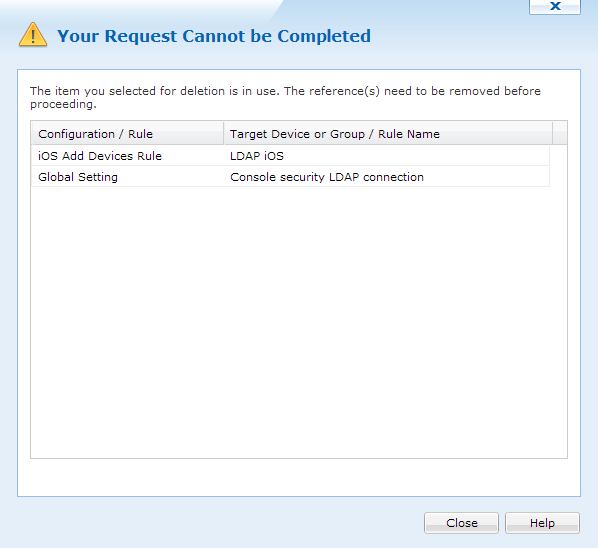
LDAP Connection Delete Warning
MobiControl shows all configurations or rules where this connection is used. It also lists the name of the target device or group/rule name. To successfully delete the connection, you must go through the list to make sure that this connection is not used anymore.