
|
Adding a Script to a Package Project |
MobiControl Package Studio allows users to add custom control scripts to perform advanced operations during the installation or uninstallation of a package. There are four points during installation or un-installation at which custom scripts can be added:
- A pre-install script is executed just before the installation of the package begins.
- A post-install script is executed just after the package is installed.
- A pre-uninstall script is executed just before the package is un-installed.
- A post-uninstall script is executed just after the package is un-installed.
Scripts can be automatically added to a project by the New Package Wizard, or can be added later by selecting the Add Script menu option from the Project menu.
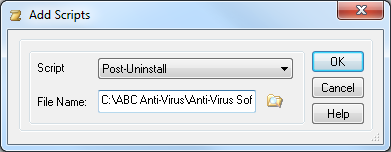
Add Script dialog box
The following table describes the fields of the Add Script dialog box:
| Field Name | Description |
|---|---|
| Script | Select one of the pre-defined script file types |
| File Name | Select the path and file name of the script file to be executed |
 Example:
Here is a pre-install script file which will execute before
installation of a package:cd \
mkdir \MyApp
cd \MpApp
rem Delete all files in case the directory already exists
del *.*
rem Make sure application is not running
kill MyApp.exe
copy "\Flash File Store\*.*" "\Flash File Store\2578\"
The commands that can be added to a package script are the same commands that are supported by the MobiControl remote DOS box. Please see the Script Command Set page for more information about remote DOS box commands. MobiControl script variables also can be used to creating device-side scripts. Please see the Script Variables page for detailed information.